
Answer every reply on X from one inbox
On X, keeping up with replies means hunting through notifications, threads and old posts. xInsightss puts every reply to you in one queue, shows what is still waiting and who wrote it, and stays out of the way while you answer.
The 7-day Pro trial includes 300 replies or follows. A card is required at checkout; it becomes $49/month unless you cancel before it ends.
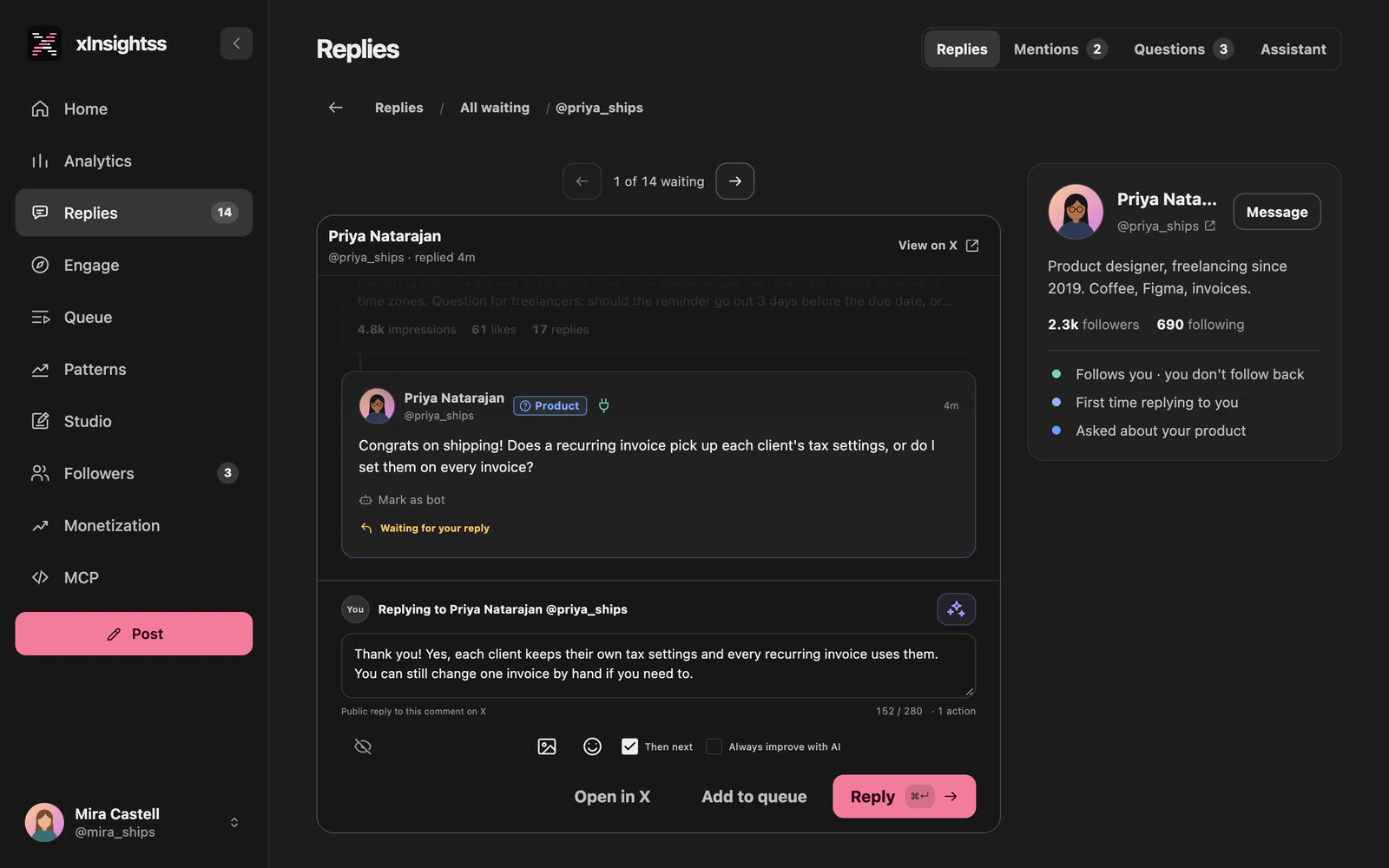
Every reply in one queue
The inbox collects the replies to you, both under your own posts and in conversations you joined under other people's posts. On your first visit it reads the replies from the last 48 hours.
After that it checks for new ones every minute while the app is open on Pro, Power and the trial, and every five minutes on Creator. When the app is closed it still checks every 30 minutes on any plan, so the queue is up to date when you come back. The closed-app checks run while you have opened the app in the last 7 days in a browser where you are still signed in; after a longer break the next visit catches up on the last 48 hours.
Each reply is Waiting, a Draft, Replied or Ignored, and the Replies tab shows how many are still waiting.
By post, or everything at once
Start from your posts: each one shows how many replies are waiting and how many you answered, sorted by newest, oldest, most views or most waiting. Or open All waiting and go through every open reply in one list, with search and sorting by newest, oldest, most views or most followers.
With Then next on, answering one reply opens the next. Ignore hides a reply you don't want to answer, and Mark as bot sends all of an account's comments straight to Ignored.
Know who you are answering
Next to each conversation is a card about the person: whether you follow each other, their follower and following counts, how many times you have answered them and when, and the last thing they said to you with your answer. First-time repliers are marked, and so are accounts with a big audience, where more people may see your reply.
If you don't follow them yet, you can follow them right there.
You write it, AI helps if you ask
The reply box shows the character count and what the reply will cost before you send it: one of your monthly replies or follows, the same with a link, plus one for each image, up to four. A reply you start and leave stays as a draft in your browser.
Suggest reply with AI writes a draft from the saved conversation, and Rewrite draft with AI reworks yours in the conversation's language. The conversation goes to OpenAI only when you click, and the result only fills the reply box: nothing is sent until you press Reply. Open in X opens X with your text instead, and you post it there; that is free and unlimited on every plan.
For less friction there is Always improve with AI, off by default. With it on, Reply becomes Improve & reply: AI polishes your text in the conversation's language and sends its version without showing it to you again. If AI's version would cost more, because it added a link, or isn't a valid reply, nothing is sent and your own text stays as a draft.
Mentions: quotes and tags
The Mentions tab lists posts that quote your posts or tag you, each marked as a quote or a mention, and you can answer them from there. It checks every five minutes while the app is open and every hour while it is closed. Posts from before the first check are not fetched.
Questions
Does the app reply for me?
No. Nothing is published until you press Reply. AI suggestions only fill the reply box, so you can change them first. If you switch on Always improve with AI, pressing Improve & reply lets AI polish the text you wrote and send its version; it is off by default.
How quickly do new replies show up?
The inbox checks every minute while the app is open on Pro, Power and the 7-day trial, every five minutes on Creator, and every 30 minutes on any plan while the app is closed, as long as you have opened it in the last 7 days in a browser where you are still signed in.
What does a reply cost?
One of your monthly replies or follows, with or without a link. Each attached image counts as one more. Reading replies, inbox refreshes and AI drafts are included, and Open in X is free and unlimited.
Does it cover quote posts and mentions?
Yes. The Mentions tab lists posts that quote your posts or tag you, from the first check on. Older posts are not fetched.
Try it on your own account.
Sign in with X and start the trial. The first import of your posts and followers usually takes under a minute.